

Example Blog Article
Example Blog Article
rearc
ai
llm
Managing pipelines with a metadata-driven framework

In short: Databricks has released SDP-META v0.1.0, the successor to DLT-META, for data engineering teams that manage Bronze and Silver pipelines from metadata instead of hand-built jobs. The release adds agentic development through an MCP Server and Agent Skill, new DAB templates, YAML support, and a full Databricks App. If you run pipelines by the dozens or hundreds, the walkthrough below covers what changed and the fastest way to start.
For those who are interested in a quick start, Rearc developed a public SDP-META Learning Lab. This is an entirely Databricks Workspace notebook driven lab, which is a great resource for getting started with SDP-META and familiarizing yourself with its architecture and DAB-based deployment.
It is designed to be a focused and iterative mini project without throwing you into the deep end of the SDP-META architecture right away. It onboards and trains new developers quickly on the development and deployment process.
DLT-META was built for “DLT” (Delta Live Tables), which has since been rebranded to Lakeflow Spark Declarative Pipelines. This release reflects the name change and incorporates some significant changes. For existing DLT-META pipelines there is a migration process documented in the “DLT-META to SDP-META migration guide”.
SDP-META is a pipeline framework for defining, deploying, and managing Bronze and Silver pipelines on Databricks Lakeflow Spark Declarative Pipelines (SDP). Its purpose is to simplify developing and maintaining your Bronze and Silver pipelines at scale.
Instead of creating many individual jobs and notebooks for each of your pipelines, there is a single notebook or generic pipeline that consolidates and standardizes your process for pipeline development. To create a new pipeline, you define a JSON or YAML configuration file and SDP-META reads that metadata and takes care of building and deploying the full processing graph.
SDP-META is for data engineering teams that wish to standardize a repeatable process for Bronze and Silver pipelines across many datasets. Engineers with a Data Warehousing background can see how this framework simplifies the process of getting data from Raw to Bronze to Silver, where the interesting queries happen.
Engineers with a Software Engineering background can see how this framework modularizes pipeline development to simplify testing and apply consistent standardized quality controls to your pipelines.
Whether this process is for a couple dozen pipelines or thousands, we recommend reviewing this framework and either adopting it directly into your process or using it to find new techniques and procedures that you can incorporate into your existing framework.
Rearc recently worked with Databricks to introduce SDP-META in a top-tier financial institution for managing and migrating their many dataflow pipelines to Spark Declarative Pipelines. The ability to easily share and review data quality assertions across pipelines, teams, and business units was instrumental in developing and maintaining a consistent data lake.
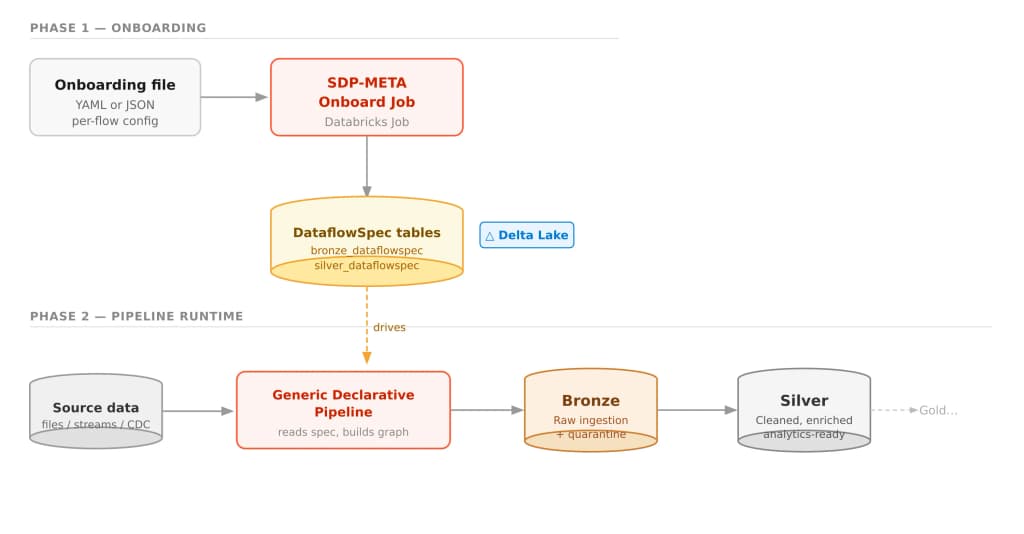 Image from https://databrickslabs.github.io/sdp-meta/docs/intro
SDP-META Wheel file: The wheel file is available on PyPI or can be built and deployed from the SDP-META repository. The wheel file must be available to both the Onboarding job and deployed Pipeline clusters.
Onboarding file: A JSON or YAML file which defines the pipeline. The onboarding file describes the data source, how to access source data, where it is located, and which files to load. It also defines target bronze and silver tables and specifies which data quality expectations and silver transform files to use.
Data quality expectations are data quality rules that are applied to your tables at the Bronze or Silver level. Rules can be specified to log or quarantine records or fail the pipeline. A Silver Transformations file defines a set of transformations and filters that are applied to records from your bronze table before they are saved to your silver table.
SDP-META Onboard job: This job is responsible for reading the pipeline specification files and populating the DataflowSpec table. This job should be run whenever pipeline specification files are changed (onboarding file, data quality expectations, or silver transformation files).
DataflowSpec tables: This artifact is created and maintained by the onboarding job. When an SDP-META pipeline is run, it reads the DataflowSpec table for its defined data_flow_group, adds or updates pipeline tables if needed, and then runs the pipeline to read from the data source and populate tables. There will be a DataflowSpec table for each stage of the pipeline, bronze and silver.
Generic Declarative Pipeline: All pipelines use the same generic declarative pipeline notebook. This notebook is responsible for installing the SDP-META wheel file to the cluster and invoking the execution module. Each pipeline is responsible for a single data_flow_group, or collection of data flows, and runs all data feeds defined in the onboarding file that share that data_flow_group key value.
Source Data: The source data in its raw format. This can be files in cloud storage, a Databricks Volume, a Delta table, Kafka, or any of the other sources that are supported by Auto Loader or Lakeflow Connect.
Bronze and Silver: The pipeline will create and populate the target tables. The Bronze layer will contain the raw data ingested into Delta format and also includes Quarantine tables for records which fail data quality rules. The Silver layer contains cleaned and enriched data ready for use in analytics or populating downstream Gold tables.
SDP-META supports, out of the box, in basic configurations, the following types of pipelines:
In addition, the SDP-META pipeline object, DataflowPipeline, includes injection points for custom data transformation functions and more complicated snapshot filter and assembling scenarios.
SDP-META includes a host of deployment methods suitable for any environment, from quick one-off exploratory deployments, code-free deployments, and deployments in tightly locked down CI/CD production environments.
This release introduces Agentic Deployments with the new MCP Server and improves on the existing deployment options available in the command line interface (CLI), the web-based app, and manual deployments via directly invoking methods of the SDP-META library from a notebook.
Here is a summary of the available deployment options in SDP-META:
Deployment Options:
| Method | Git-trackable | Touches workspace | Interface | Best for |
|---|---|---|---|---|
| DAB | Yes | Yes | Command Line | Production, teams, CI/CD |
| Interactive CLI | No | Yes | Command Line | One-off, quick start |
| Databricks App | No | Yes | Browser | Non-CLI users, demos |
| Manual Job Setup | Varies | Yes | Console or Notebook | No CLI access, custom orchestration |
| MCP (scaffolding) | Yes (bundle) | No | Agent | AI-assisted DAB workflows |
Define your pipelines, infrastructure, and deployment options using Databricks bundle files, (databricks.yml, variables.yml, onboarding job, and pipelines). You can either create and manage these files directly through an IDE or manage them using command line utilities, such as ‘bundle-init’ or ‘bundle-add-flow’. This option is best suited for teams using CI/CD pipelines, multi-environment deployments, and Git-tracked infrastructure as code.
SDP-META provides command line utilities for onboarding and deploying pipelines directly without writing any YAML. This is great for quick one-off deployments and demos and for a quick start using SDP-META in development and demo environments. For production and regulated environments, it is recommended to use the DAB approach and maintain your configuration files with a version control system such as Git.
A Flask web app that wraps the full onboarding workflow in a browser GUI. This is a click-based and code-free method that makes it easy to configure and deploy pipelines without using the command line.
For teams that need a more custom deployment approach than DAB. SDP-META provides the ability to directly configure the onboarding job and pipeline through the Databricks Workflows UI or a custom notebook. Either deploy a Python Wheel Job using the Databricks UI or invoke the Onboarding commands directly from a custom notebook using OnboardDataflowspec(...).onboard_dataflow_specs().
An AI agent uses MCP tools to scaffold and validate bundles locally, then hands off to the command line or DAB for live workspace deployment.
SDP-META v0.1.0 introduces first-class agentic support for pipeline development through two complementary components: an Agent Skill and an MCP Server.
Together, they allow AI coding agents, such as Claude Code and Cursor, to scaffold, inspect, and validate SDP-META bundles using natural language.
| Tool | What the agent can do |
|---|---|
sdp_meta_bundle_init | Scaffold a complete new DAB – job, pipeline, variables, runner notebook, and flow recipes |
sdp_meta_bundle_add_flow | Append typed flow entries to a bundle's onboarding file |
sdp_meta_bundle_validate | Run databricks bundle validate plus SDP-META sanity checks |
sdp_meta_list_templates | List every packaged onboarding, DQE, and silver-transformation template |
sdp_meta_get_onboarding_template | Return the raw content of any packaged template by name |
Packaged templates are also exposed as MCP resources under the sdp‑meta://templates/ URI prefix, so agents can read them directly as reference material when constructing onboarding files.
The MCP tools are designed to be composed in sequence. A well-configured agent follows this pattern without prompting:
For teams managing many onboarding tables, this unlocks a vastly different workflow: describe your sources in a natural language, and let the agents produce the onboarding files and data quality validations. The agent performs the tedious structural work, such as ordering fields, incrementing IDs, and ensuring group-name consistency. This eliminates the kind of repetitive, schema-heavy work that leads to costly time-consuming errors in deployment and validation.
Here are a few example prompts, ranging from simple to more complete, for invoking the SDP-META MCP Server tools:
Minimal: just scaffold a bundle "Scaffold an SDP-META bundle for my project using quickstart defaults."
Realistic: a new pipeline from a description "I need to onboard three tables from /Volumes/main/landing/files/ - orders, customers, and transactions. Each needs bronze and silver layers with basic data quality rules. Scaffold an SDP-META bundle and add flows for all three."
Template-first: when you want to see a reference template first "Show me an example SDP-META onboarding template for an Event Hubs source, then scaffold a bundle using those settings for my telemetry topic."
Validate an existing bundle "Validate my SDP-META bundle at ./my_sdp_meta_pipeline against the dev target and fix any issues you find."
End-to-end with deployment "Set up an SDP-META pipeline for the tables in my UC schema raw.landing. Bronze and silver layers, YAML format, split pipelines. Scaffold the bundle, add all the flows, validate it, then deploy to my workspace using the dev profile."
The key trigger phrases that cause the agent to load the SDP-META skill and reach for the MCP tools are: "sdp-meta", "dlt-meta", "onboard a dataflowspec", "metadata-driven pipeline", "bronze/silver pipeline from config", and "scaffold an sdp-meta bundle".
One last thing regarding SDP-META: as stated by Databricks, “please note that all projects released under Databricks Labs are provided for exploration only, and are not formally supported by Databricks with Service Level Agreements (SLAs).” This is an open source project which can be extended and modified to fit the needs of your deployment environment. Keep that in mind if your environment requires a formal support agreement. Rearc may be able to assist you with your development, pipeline onboarding, training, or support needs. Please contact us if you are interested in pursuing any of these in your Databricks pipeline environments.
Read more about the latest and greatest work Rearc has been up to.
Example Blog Article
Managing pipelines with a metadata-driven framework

Databricks renamed Delta Sharing to OpenSharing and handed governance to the Linux Foundation. Here is what actually changed under the hood, and why the same three-object model still applies.

Photon and AQE (Adaptive Query Execution) make the work you already do faster. The Delta transaction log decides how much work exists at all — here are five levers you can read straight out of _delta_log/ and the fixes each one points to.
Tell us more about your custom needs.
We’ll get back to you, really fast
We will evaluate your query and respond within 2 business days.
Kick-off meeting
We will schedule a quick meeting to further understand your use case and start working toward a solution together!